iPhone · Android + Windows
Your PC, under your thumb.
Thumb turns your iPhone or Android phone into the PC's remote: a stream deck, a trackpad and keyboard, volume and media controls, file transfer, screen capture and a live system monitor.
Everything in one app
PNG · Images\ThumbMP4 · Vidéos\ThumbNVIDIA · AMD · Intel
On the PC
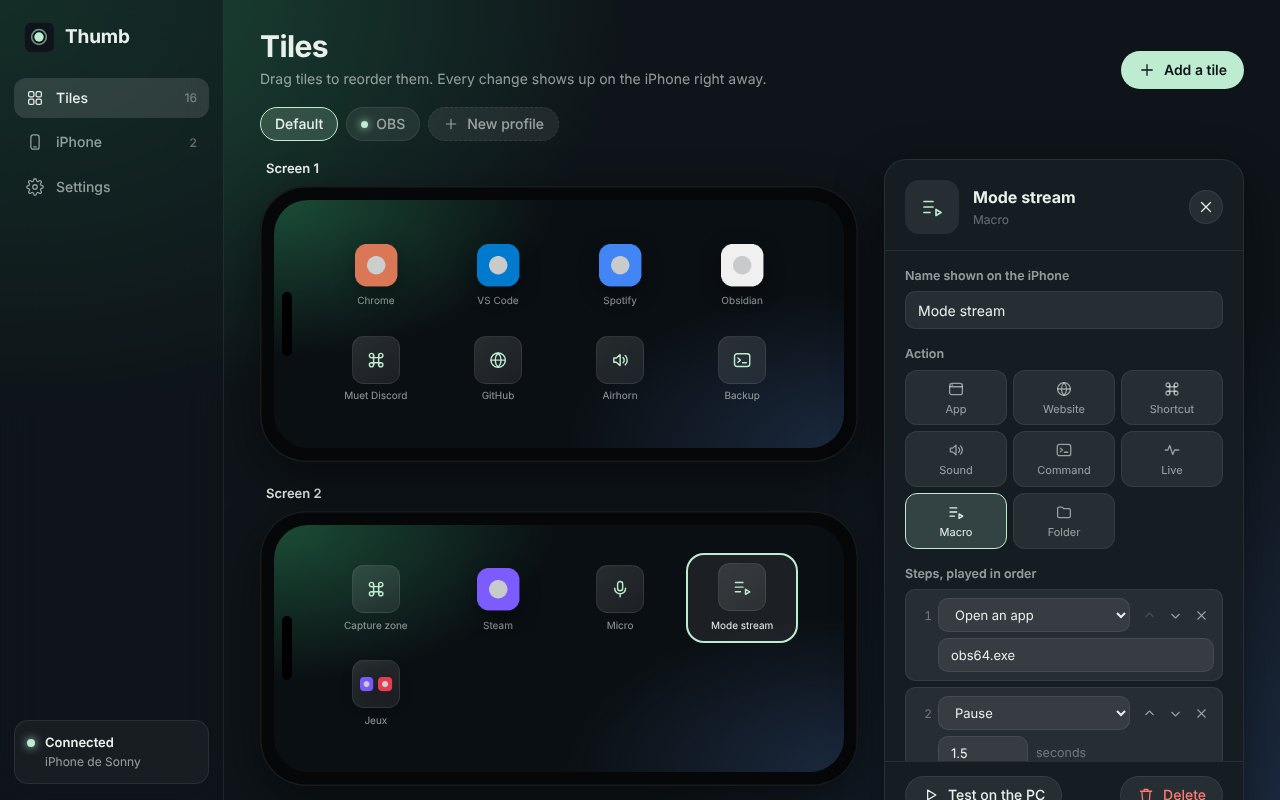
Set up your tiles on Windows
The Thumb window lays out your tiles the way the iPhone shows them. Drag to reorder, pick an app from the Start menu, record a shortcut, build a macro step by step. Every change reaches the iPhone at once.
Setup
Paired in a minute
The iPhone and the PC talk directly over your Wi-Fi. No account, no cloud, nothing leaves your home network.
Install Thumb on the PC
The installer sets everything up. Thumb then waits next to the clock, and can start with Windows.
Open Thumb on the iPhone
It finds the PCs on your Wi-Fi by itself. Pick yours.
Type the code shown on the PC
Once, and that's it. The iPhone reconnects on its own after that.
482916
Get Thumb on both sides
Install the Windows app on the PC, and the phone app from the App Store or as an APK for Android. All free.
Windows 10 (2004 or later) or Windows 11, 64-bitiPhone with iOS 26 or laterAndroid 8.0 or later